Dell Inspiron 15 3521 Cooling Fan
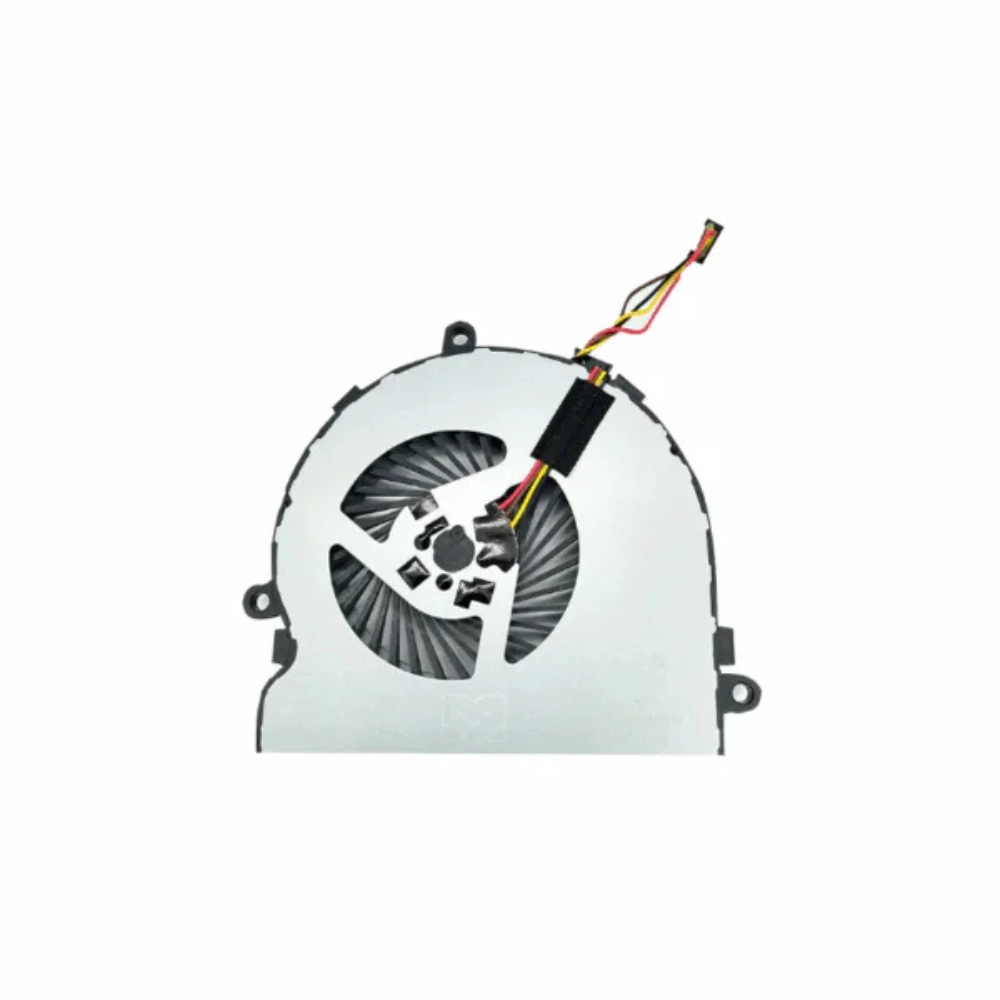
A properly working cooling fan is important for maintaining stable temperatures inside an older laptop. The Dell Inspiron 15 3521 cooling fan is designed as a replacement option for compatible Dell Inspiron systems, including the Inspiron 15 3521 and 15R-5521 models.
When a laptop fan becomes noisy, stops spinning, or cannot maintain adequate airflow, internal temperatures can rise during normal operation. Replacing the faulty fan can help restore the laptop’s intended cooling performance without replacing the entire computer.
Compatibility
This replacement fan is intended for compatible:
- Dell Inspiron 15 3521
- Dell Inspiron 15R-5521
- Related compatible variants where the fan specification matches
Laptop model numbers can sometimes have different internal configurations. Before purchasing, compare the connector, fan shape, mounting points and part information with the fan currently installed in your laptop.
If you are unsure about compatibility, contact AHS Store with your laptop model and a clear picture of the existing fan before placing an order.
Who Should Buy It?
This Dell Inspiron 15 3521 fan is worth considering if your laptop has:
- A cooling fan that has stopped working
- Excessive fan noise or grinding sounds
- Unusual heat during everyday use
- Reduced airflow from the cooling system
- A damaged or worn-out internal fan
- A fan that intermittently starts and stops
It can be particularly useful when the rest of the laptop is functioning normally and only the cooling fan needs replacement.
Who Shouldn’t Buy It?
This isn’t the right replacement if your laptop uses a different fan design, connector or mounting arrangement.
You should also avoid replacing the fan without checking the actual cause of overheating. Dust buildup, blocked vents, dried thermal paste, a damaged heatsink or other hardware problems can also contribute to high temperatures.
If the existing fan still works correctly and your laptop is only slightly warm during normal use, replacing it may not provide a meaningful benefit.
Advantages
The main advantage of replacing a faulty cooling fan is restoring proper airflow inside the laptop. A functioning Dell Inspiron 15 3521 CPU fan can help move heat away from the internal cooling assembly and reduce the risk of thermal problems caused by inadequate airflow.
Other practical benefits include:
- Replacement instead of replacing the entire laptop
- Helps address fan-related overheating
- Suitable for repairing an older Inspiron system
- Useful when the original fan becomes noisy or stops operating
- Can improve everyday cooling when the original fan is defective
Limitations
A replacement fan cannot solve every overheating problem.
Laptop temperature also depends on the heatsink, thermal paste, ventilation, workload and cleanliness of the cooling system. If the heatsink is heavily blocked or thermal paste has deteriorated, those issues may need attention as well.
Compatibility should also be confirmed before installation. Similar Dell models can use fans that look almost identical but have different connectors or mounting arrangements.
Daily Use
For normal activities such as web browsing, office work, studying, watching videos and light multitasking, a properly functioning cooling system helps the laptop maintain stable operating temperatures.
If the original fan is failing, you may notice unusual noise, inconsistent fan operation or excessive heat even during relatively light workloads. Replacing a defective Dell 15R-5521 cooling fan can restore the airflow required by the laptop’s internal cooling system.
It is still important to keep the laptop’s ventilation openings clear and periodically clean accumulated dust.
Buying Advice
Before ordering, verify the following:
- Your laptop is a Dell Inspiron 15 3521 or compatible 15R-5521 variant.
- The replacement fan has the same connector type.
- The mounting holes and physical shape match your existing fan.
- The existing fan is actually responsible for the cooling problem.
- The product images and specifications match your laptop’s internal assembly.
If possible, compare the replacement with your current fan before installation. This is especially important with older Dell laptops because multiple configurations may exist under similar model names.
For the Dell Inspiron 15 3521 cooling fan price, check the current AHS Store product listing for the latest availability and pricing.
Replacement Fan vs. Cleaning the Existing Fan
| Situation |
Better Option |
| Fan is heavily dusty but works normally |
Clean the fan and heatsink |
| Fan makes grinding noises |
Consider replacement |
| Fan has stopped spinning |
Replacement is usually appropriate |
| Laptop overheats because vents are blocked |
Clean the cooling system |
| Fan is damaged physically |
Replace the fan |
| Laptop remains hot after fan replacement |
Check heatsink and thermal paste |
This comparison is important because not every cooling problem requires a new fan.
Installation Considerations
Replacing an internal laptop fan requires opening the laptop and disconnecting the existing cooling assembly. If you are not comfortable working with laptop hardware, professional installation is recommended.
Before installation, shut down the laptop completely and disconnect its power source. Handle the internal components carefully and avoid forcing the fan connector.
If the cooling assembly is removed, the condition of the thermal interface should also be checked before reassembly.
Trust & Compatibility Support
AHS Store provides laptop parts and accessories for customers looking for replacement components in Pakistan. For model-specific parts such as this fan, compatibility should be confirmed rather than relying only on the product name.
If you’re unsure whether this fan fits your laptop, share your Dell model number and existing fan photo with AHS Store before purchasing.You can also check the Dell Inspiron 3521 support page for official model information and documentation.
Delivery Across Pakistan
The Dell Inspiron 15 3521 cooling fan can be ordered through AHS Store for customers across Pakistan. Check the product page for current stock, price, available payment methods and delivery details.
For a replacement component, confirm availability before ordering if your laptop is currently unusable due to a failed cooling fan.
For users comparing replacement options, this Dell Inspiron 15 3521 cooling fan is intended for compatible Inspiron configurations where the original cooling unit needs replacement.
Before ordering, you can also explore our Laptop Panels for other compatible components.
Frequently Asked Questions
Is this fan compatible with Dell Inspiron 15 3521?
It is intended for compatible Dell Inspiron 15 3521 configurations. Check the connector, mounting pattern and existing fan design before ordering.
Does it fit Dell Inspiron 15R-5521?
The product is intended to cover compatible 15R-5521 configurations, but the exact internal fan specification should be compared before purchase.
When should I replace my Dell Inspiron 15 3521 fan?
Replacement may be appropriate when the fan stops spinning, produces abnormal mechanical noise, or no longer provides adequate airflow.
Can a faulty fan cause laptop overheating?
Yes. If the fan cannot move enough air through the cooling system, heat can build up inside the laptop, particularly under heavier workloads.
Should I replace the fan or clean it?
If the fan is simply clogged with dust and operates normally, cleaning may be sufficient. A damaged, noisy or non-working fan generally requires replacement.
Will replacing the fan make my laptop faster?
Not directly. A new fan does not increase the laptop’s processor performance. However, restoring proper cooling can help prevent excessive heat from affecting normal operation.
Can I install the fan myself?
It is possible for someone experienced with laptop repairs, but the laptop must be opened and the internal cooling assembly handled carefully. Professional installation is safer if you are unfamiliar with laptop hardware.
How can I confirm compatibility before buying?
Compare your laptop model, existing fan, connector and mounting points with the product information. You can also contact AHS Store with your model details and a photo of the existing fan.









 Courier delivery
 Secure Payment



 Check Warranty
 Free 10-Day returns (If goods have problems)


Reviews
Clear filtersThere are no reviews yet.